

You’re standing at a crossroads. You’ve got a logo, you’ve got a vision for your brand’s packaging, and now you need to actually make it happen. But every time you try to figure out the best path forward, you hit a wall of confusion.
Should you buy a Cricut and do this yourself? Spend $200 on screen printing equipment? Or just bite the bullet and order from a custom supplier with their 50-unit minimums?
And underneath all of this: Am I going to waste money either way?
I hear you. This is one of the most common strategy questions we get from e-commerce businesses, and the honest answer is that there’s no single right answer for everyone. The right choice depends on your volume, your budget, your technical comfort level, and how you value your time.
Let me walk you through all three options – the costs, the effort, and the real outcomes – so you can make the decision that makes sense for your business. And if you’d rather skip the DIY entirely, rhkpackaging offers custom printed poly mailers with no equipment required – just submit your design and let the supplier handle the rest.
The Three Paths to Custom Poly Mailers
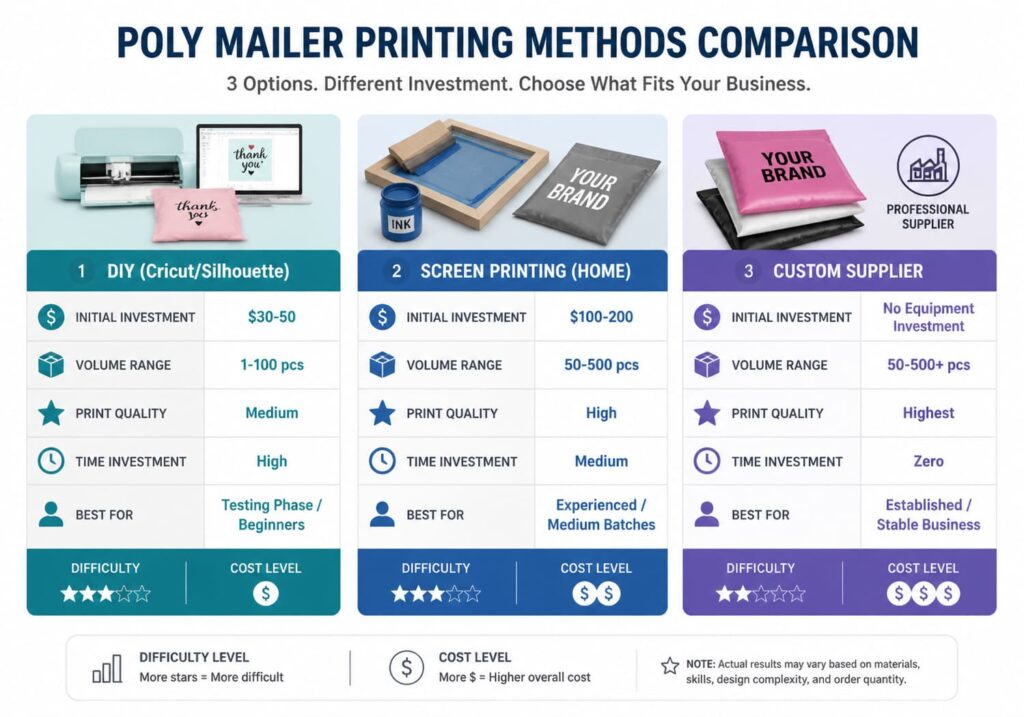
Before we dive into specifics, here’s the high-level overview of your options:
| Option | Upfront Cost | Per-Unit Cost | Best For | Time Investment |
|---|---|---|---|---|
| Cricut/Silhouette DIY | $30-50 | $0.50-1.00 | 1-50 mailers | High (your time) |
| Home Screen Printing | $100-200 | $0.20-0.50 | 50-500 mailers | Medium |
| Custom Supplier | $0 | $0.38-3.74 | 50+ mailers | None (outsourced) |
Let’s look at each option in detail so you can make an informed choice.
Option 1: DIY with Cricut or Silhouette (Easiest, $30-50)
If you’re technically nervous and want to test the waters, the DIY route with a personal cutting machine is your entry point. This is exactly where we guide most early-stage businesses who want custom packaging without committing big money upfront.
What You Need
Required Equipment:
- Cricut Maker, Cricut Explore, or Silhouette Cameo: $30-50 used on Facebook Marketplace or eBay
- Heat transfer vinyl (HTV): $15-25 per roll – you’ll want a color that matches your brand
- Weeders and scrapers for removing excess vinyl: Often included with machines or $5-10
- Parchment paper or Teflon sheets: $5-10
Optional but Recommended:
- Small heat press (around $50-80) – you can use a household iron but results are less consistent
- Rolling ball tool for weeding intricate designs
Total upfront investment: $30-50 for basic setup, up to $100-130 for a proper setup with heat press
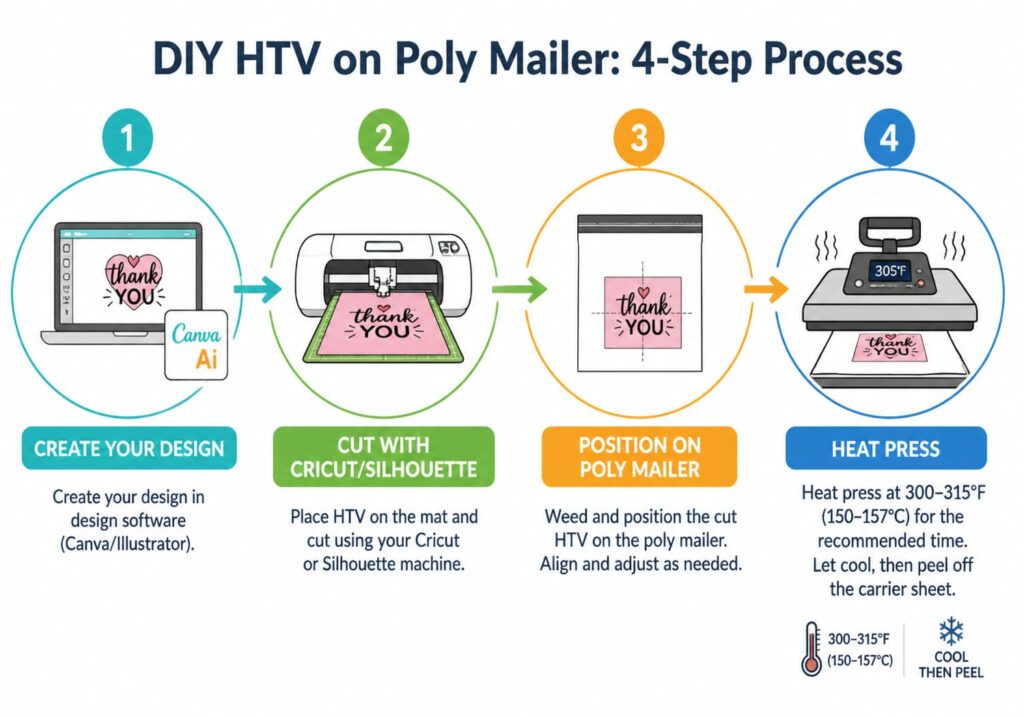
Step-by-Step Process
Step 1: Design in Cricut Design Space or Silhouette Studio
Create or import your logo. For HTV, you want simple designs with solid colors – gradients and complex photographs don’t work well. Set your design dimensions to fit your poly mailer. Start with self-sealing poly mailers that provide a smooth, consistent surface for HTV application.
Step 2: Cut the Vinyl
Load your HTV into the machine, select the appropriate settings (usually “iron-on” or “HTV” material), and cut your design. Mirror the design before cutting since HTV gets applied face-down.
Step 3: Weed the Vinyl
Remove the negative space from your cut design using weeding tools. This is the tedious part for intricate logos – budget 5-10 minutes per design depending on complexity.
Step 4: Position on Poly Mailer
Place your weeded design on the poly mailer where you want the logo. Use parchment paper to protect both the vinyl and your heat press or iron.
Step 5: Apply with Heat
Set your heat press to 200-220°F (or iron to medium-high without steam). Press for 15-20 seconds with firm, even pressure. Let cool for 30 seconds before removing the carrier sheet.
Step 6: Check and Repeat
Peel back the carrier sheet slowly. If any part of the design hasn’t adhered, replace the parchment paper and press for another 5-10 seconds.
Our Verdict: Perfect for Startups
We’ve helped dozens of businesses launch their custom packaging through this method. The results are genuinely good for the investment level. Yes, it’s more hands-on than ordering from a supplier, and yes, each mailer takes 5-10 minutes of your time. But the cost per unit stays reasonable, and you can iterate on designs without commitment.
Real example: A handmade candle business used this method for their first 150 mailers. Total investment: $45 on a used Cricut, $20 on HTV. Cost per mailer: about $0.43. They eventually switched to professional printing when they scaled past 200 monthly orders, but this method gave them professional-looking packaging while they validated their business.
Option 2: Screen Printing at Home (Medium Investment, $100-200)
Ready to level up your printing game? Home screen printing opens up better quality and lower per-unit costs for moderate volumes. This is the option we recommend when someone has outgrown DIY but isn’t ready for supplier minimums.
Equipment List
Essential Equipment:
- Screen printing kit (frame, mesh, squeegee): $80-150 for a starter kit
- Photosensitive emulsion and scoop: $20-30
- UV light source for burning screens: $30-50 for a basic setup
- Screen printing ink (water-based or plastisol): $20-40 per quart
- Ink spreader or palette: $10-15
- Flash dryer or heat gun: $50-100 for proper curing
Total upfront investment: $100-200 for a functional setup
Process Walkthrough
Step 1: Prepare Your Screen
Coat your screen mesh with photosensitive emulsion in a dark room (emulsion hardens with UV exposure, so avoid sunlight). Let dry completely in a dark space – usually 24 hours for thorough drying.
Step 2: Burn Your Design
Print your design on a transparent film positive (most inkjet printers work for this). Place the film on your coated screen and expose to UV light for the time specified by your emulsion manufacturer – typically 10-20 minutes.
Step 3: Develop the Screen
Wash the exposed screen with water. The areas blocked by your design will remain hardened and unprinted, while the rest washes away to create your stencil. Let dry completely.
Step 4: Register and Print
Position your screen on your poly mailer, add ink to the top edge, and pull the squeegee across at a 45-degree angle to flood the screen and push ink through onto the mailer.
Step 5: Cure the Ink
Heat cure your printed mailer using a flash dryer or heat gun to the temperature recommended for your specific ink (typically 320-360°F for water-based, 280-320°F for plastisol).
Step 6: Clean Up
Immediately clean your screen and tools with appropriate solvents. Water works for water-based inks; plastisol requires ink degradent or mineral spirits.
Our Verdict: For Growing Businesses
Home screen printing makes sense when you’re printing 50-500 poly mailers regularly and have the space and patience to develop the skill. The per-unit cost drops significantly, and the quality matches what you’d get from a professional print shop.
Option 3: Order from a Custom Supplier (Best Quality, MOQ 50-500)
When DIY doesn’t make sense anymore – whether because of volume, time, or quality requirements – professional suppliers deliver the best results with zero technical burden on your end. And here’s the honest truth: many sellers start with DIY because they want to avoid supplier minimums, but once you do the math on your own time investment, ordering from a supplier often wins. That’s especially true when you factor in the consistency factor – rhkpackaging’s custom printed options, for example, deliver identical quality across every single mailer, which is hard to replicate by hand.
How It Works
Typical Process:
- Submit your artwork (AI, EPS, or high-resolution PDF)
- Supplier reviews for printability and provides a proof
- You approve the proof
- Production typically takes 7-14 business days
- Your custom mailers ship to your warehouse or fulfillment center
What You're Paying For
Per-unit cost breakdown:
- 1-color printing (50-100 MOQ): $2.50-3.74 per unit
- 1-color printing (250+ units): $1.00-1.50 per unit
- Full-color printing (100+ units): $1.50-3.74 per unit
What the price includes:
- Professional color matching and proofing
- High-quality printing on commercial equipment
- Consistent quality across entire order
- No setup or equipment costs on your end
- Your time: essentially zero after initial design submission
Turnaround Time
Standard production: 7-14 business days
Rush orders: Some suppliers offer 3-5 day rush production for 25-50% premium
Shipping: Add 2-7 days depending on supplier location and shipping method
Realistic timeline from order to delivery: 2-4 weeks
This means you need to plan ahead. Custom printed poly mailers aren’t an “I need these today” solution – they’re a strategic investment in your packaging that requires planning.
Our Verdict: When You Need Professional Results
Professional printing is the right choice when:
- You ship 100+ packages per month and packaging is part of your brand strategy
- You’ve validated your product-market fit and are ready to invest in branding
- You don’t have time or desire to DIY your printing
- You need consistent, predictable quality
- You’re past the point where your time is worth more than the cost savings from DIY
For businesses at this stage, the per-unit cost premium over DIY is genuinely worth it. You’re not just paying for printing – you’re buying back your time and buying consistency.
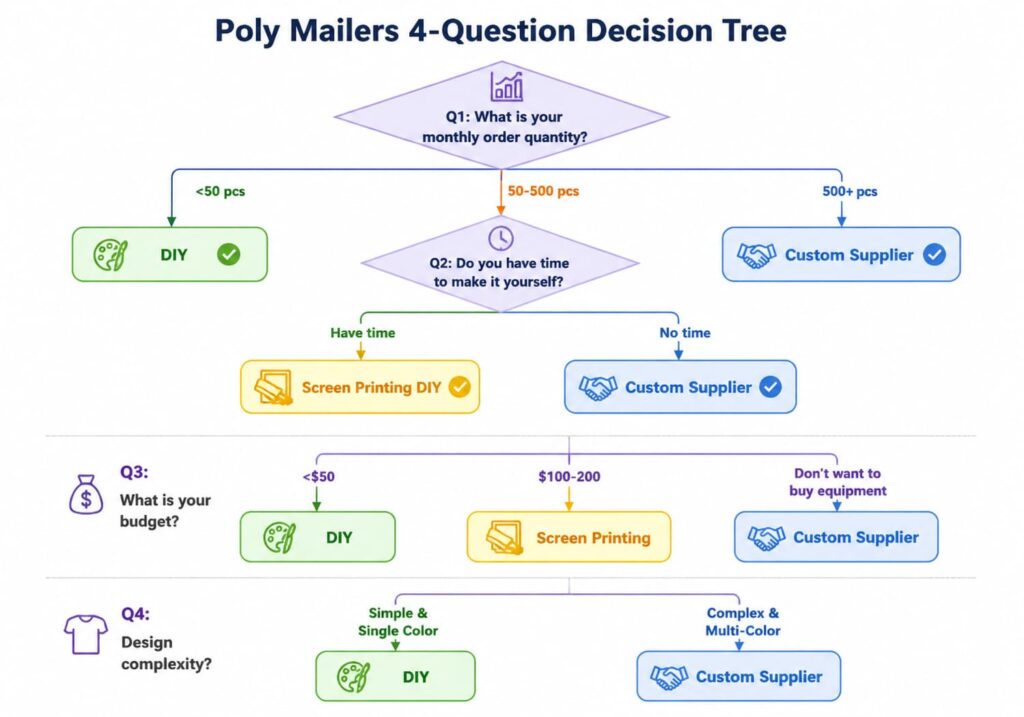
How to Decide: The Decision Tree
Still unsure which path is right for you? Here’s our practical decision framework:
Question 1: How many poly mailers do you need?
- 1-50: Go DIY with Cricut/Silhouette
- 50-500: Go home screen printing OR start with small supplier order
- 500+: Order from supplier – DIY doesn’t make economic sense
Question 2: What’s your budget for upfront investment?
- Under $50: DIY is your only realistic option
- $50-200: DIY or home screen printing
- No upfront budget: Supplier order (but commit to minimum quantity)
Question 3: How do you value your time?
- Time is more valuable than money (busy founders): Supplier order
- Money is more valuable than time (budget-conscious): DIY
- Balance of both: Home screen printing
Question 4: What’s your design complexity?
- Simple logo, 1-2 colors: Any option works well
- Full-color photograph or gradient: Supplier digital printing only
- Intricate details or small text: Supplier recommended (DIY limitations show)
Common Mistakes We See
In working with hundreds of businesses on this decision, here are the patterns we’ve seen lead to regret:
Mistake 1: Buying Equipment Before Validating Volume
The scenario: A business spends $150 on screen printing equipment, uses it for 3 months, then realizes they’re only shipping 20 packages per month. The math never made sense for that volume.
The lesson: If your volume doesn’t support the investment within 6 months, don’t make the investment. Order from a supplier instead.
Mistake 2: Underestimating DIY Time
The scenario: Someone calculates the material cost of DIY and it looks great. What they didn’t factor in: 8 minutes per mailer for design, cutting, weeding, and application. For 100 mailers, that’s 13 hours of work.
The lesson: Factor YOUR TIME into the cost calculation. If your time is worth $25/hour and DIY takes 10 minutes per mailer, your real cost is $4.17 per mailer before materials.
Mistake 3: Ordering Custom Before Testing Design
The scenario: A business orders 500 custom printed mailers with their logo. When they receive them, they realize the logo placement looks wrong on the actual mailer, or the colors don’t match their website, or their font looks dated.
The lesson: Always test your design on a few plain mailers first using DIY methods. Make sure you love it before committing to 500 units.
Mistake 4: Choosing Based on Price Alone
The scenario: Someone picks the cheapest supplier and gets what they paid for – inconsistent thickness, color variations between mailers, and delayed delivery that disrupted their product launch.
The lesson: Price matters, but quality consistency and reliable delivery matter more. A supplier who’s $0.10 more per unit but delivers on time with perfect quality is worth the premium. That’s true whether you’re comparing suppliers like rhkpackaging against other options or evaluating any other vendor in this space.
FAQ - Making Custom Poly Mailers
Q: Can I make custom poly mailers without special equipment?
A: Yes – use heat transfer vinyl with a Cricut/Silhouette and household iron. Quality won’t match professional printing, but it’s affordable for small volumes.
Q: What's the minimum order for custom printed poly mailers?
A: Most suppliers require 50-100 units. Some offer MOQs as low as 25-50 units at premium per-unit pricing.
Q: How long does DIY take?
A: 5-10 minutes per mailer for HTV (design, cut, weed, apply). Screen printing is faster once set up – 30-50 mailers per hour.
Q: When does supplier ordering beat DIY?
A: When ordering 100+ units regularly and your time is worth $20+/hour. The cost premium becomes less than your labor value.
Q: Can I print photographs?
A: Not with DIY – you’ll need a supplier with digital printing ($1.50-3.74/unit, 100+ MOQ).
Q: Should I test before bulk ordering?
A: Always. Print 3-5 test units first to verify your design looks right on actual poly mailer material.
Ready to eliminate seal failures and size mismatches from your supply chain?
Planning to purchase poly mailers in bulk? Send us your size, thickness, quantity and destination requirements.Request a formal quote with your specifications. Response within 4 business hours.
RHK Packaging — ISO 9001:2015 Certified Manufacturer Since 2010
[email protected]