




Your poly mailer package should arrive. But what if it does not? The number one reason packages get lost or misdelivered is not carrier error—it is label failure. Wrinkled barcodes, peeling labels, and addresses that scanners cannot read cause more lost packages than anything else. This guide focuses on one goal: ensuring your poly mailer package arrives at its destination by teaching you how to address poly mailers the right way.
Every year, ecommerce sellers lose thousands of dollars to preventable shipping errors. A label that falls off. An address that smudges. A barcode that cannot be scanned. These are not carrier problems—they are addressing problems. And they are entirely avoidable.
This guide covers everything you need to know about how to address poly mailers correctly, with special emphasis on the “lumpy package” problem that causes scan failures, and the specific techniques that keep labels attached and readable throughout the shipping process.
Why Proper Poly Mailer Addressing Matters
Most sellers think addressing a poly mailer is simple: write the address, slap on a label, and ship. But the reality is far more complex. Poly mailers are flexible plastic bags, not rigid boxes. That flexibility creates unique challenges that rigid packaging does not have.
When a package moves through automated sorting facilities, scanners read barcodes from multiple angles. A label on a rigid box presents a flat, predictable surface to these scanners. A label on a flexible poly mailer? It bends, curves, and wraps around the package’s surface as the mailer shifts during transport.
According to carrier data, packages with unreadable barcodes are 3-5 times more likely to experience delivery failures. For businesses shipping 100+ packages daily, that translates to potentially dozens of misdelivered or returned packages per month—all preventable with proper addressing techniques.
Beyond scanning issues, improper addressing also leads to labels falling off entirely. Poly mailer plastic surfaces are often coated with release agents from manufacturing that prevent adhesives from bonding properly. Combined with the jostling of automated sorting, a label applied without proper surface preparation can peel off within hours of shipping.
The cost is not just financial. Lost packages mean customer service headaches, negative reviews, and potential customer loss. A package that never arrives costs far more than the price of a replacement—it costs your reputation.
The Basic Layout: Where Each Piece of Information Goes
Correct address placement on a poly mailer follows a specific layout pattern that carriers and sorting facilities expect. Deviating from this pattern increases the risk of scanning failures and misdelivery.
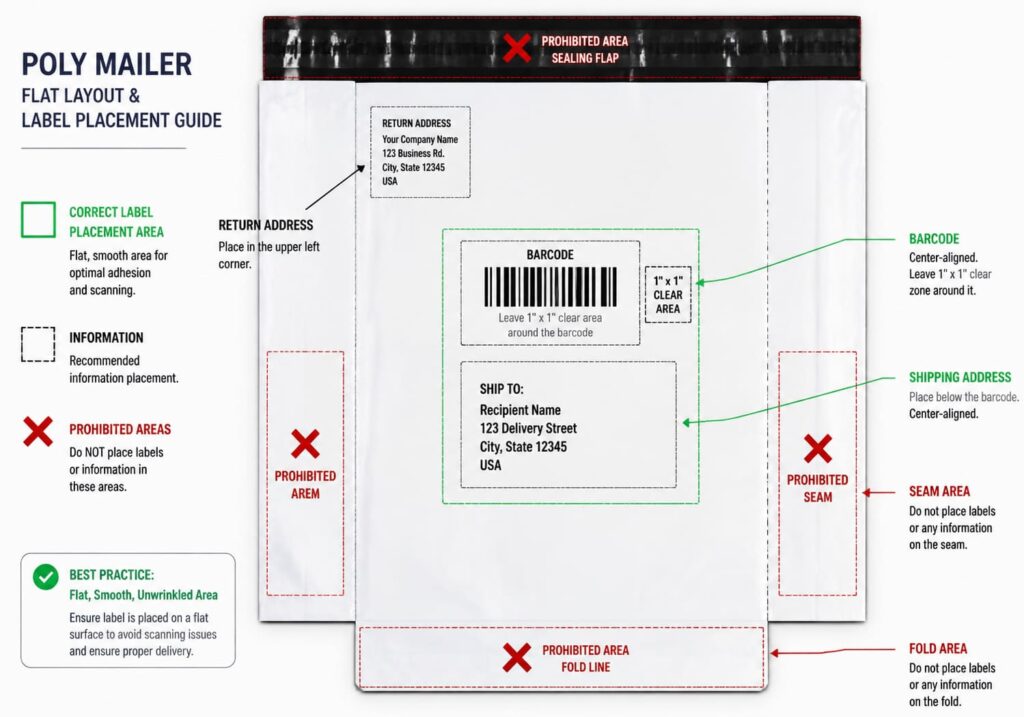
Recipient Address Placement (Center Front)
The recipient address—the destination where your package is going—belongs in the center front of the poly mailer. This is not just convention; it is where automated sorting equipment expects to find it.
Place the address on the flattest, largest section of the front panel. Avoid:
- Seams: The heat-sealed edges of poly mailers create raised surfaces that prevent labels from lying flat
- The sealing flap: The adhesive strip area is never flat once sealed
- Folds and creases: Anywrinkling in the film will translate to your label
- Curved areas: The sides of poly mailers curve inward; the center of the panel is typically flattest
Leave plenty of white space around the address. Nearby graphics, seams, or the edges of the bag can interfere with optical scanner reading. Most experts recommend leaving at least 1 inch of clear space on all sides of the address block.
Return Address Placement (Top Left Corner)
The return address goes in the top left corner of the poly mailer. This is your safety net: if the package becomes undeliverable for any reason, the carrier needs a way to return it to you.
While USPS does not strictly require return addresses on domestic packages, skipping them is never recommended. Without a return address, undeliverable packages cannot be returned to sender—they may be opened by the carrier, held for pickup, or disposed of.
Write or print the return address in all capital letters. Use a smaller font than the recipient address to create visual hierarchy. The recipient address should always be more prominent.
Shipping Label Position
If you are using a printed shipping label from a carrier like USPS, UPS, or FedEx, place it in the center front area described above. The barcode on the label is what matters—the address text is secondary for scanning purposes.
For USPS labels specifically, the label should be placed horizontally, not vertically. Vertical barcodes get wrapped around curved surfaces during processing and cannot be fully scanned. Always orient labels horizontally.
How to Write on Poly Mailers
Handwritten addresses on poly mailers require the right tools. The plastic surface is non-porous, which means most pens will not adhere properly and will smear easily.
Best Pens and Markers for Plastic Surfaces
Only permanent markers work reliably on poly mailers. The ink must be waterproof and quick-drying to prevent smudging during handling.
| Pen Type | Suitable? | Notes |
|---|---|---|
| Sharpie / Permanent Marker | Yes | Best choice. Waterproof, quick-drying, high contrast |
| Ballpoint Pen | No | Smears easily on plastic, not waterproof |
| Gel Pen | No | Takes longer to dry, smudges on glossy surfaces |
| Felt-tip Marker | No | Inconsistent coverage, may smear |
| Metallic Marker | No | Rubs off during handling, not scanner-readable |
Dark-colored poly mailers require white labels: Silver, gold, or other metallic markers will rub off during normal handling and cannot be scanned reliably. On black or dark-colored poly mailers, always use white adhesive labels with printed or handwritten addresses.
Handwriting Tips for Scanner Compatibility
If you must handwrite addresses on poly mailers, follow these guidelines to maximize scanner compatibility:
- Use all capital letters: Carriers recommend uppercase exclusively for machine readability
- Print clearly: Cursive handwriting is difficult for optical character recognition (OCR) systems
- Leave lines straight: Slanted or wavy lines can cause OCR failures
- Use black ink on light mailers: Maximum contrast improves readability
- Test before bulk shipping: Write a test address and photograph it to verify scanner compatibility
Allowing Ink to Dry Before Stacking
Permanent marker ink takes approximately 30 seconds to 1 minute to dry completely on plastic surfaces. Stack or package poly mailers too quickly, and the address will smudge—transferring ink to the inside of the bag or other packages.
For businesses shipping high volumes, set up a staging area where written packages can sit for at least 60 seconds before loading into bins or shipping containers. This simple step prevents smudging and maintains address legibility throughout the chain of custody.
Using Printed Labels on Poly Mailers
Printed adhesive labels provide superior durability and professional appearance compared to handwriting. Most ecommerce businesses use printed labels for this reason.
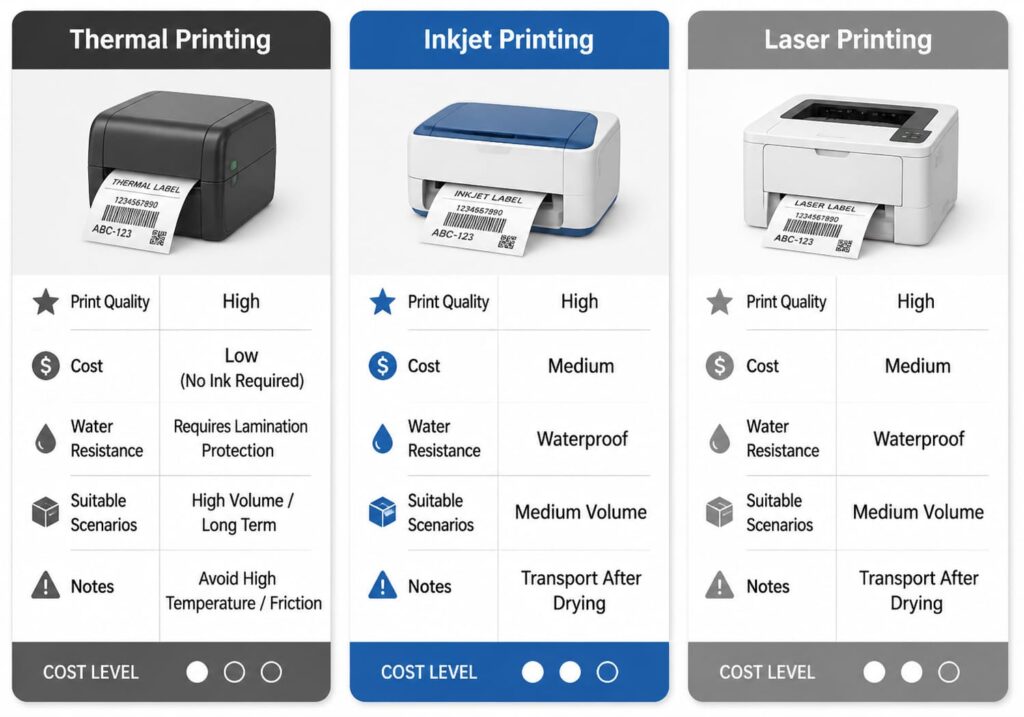
Printer Type Comparison
Different printer technologies produce labels with different characteristics:
| Printer Type | Pros | Cons | Best For |
|---|---|---|---|
| Thermal (Direct) | Smudge-proof, no ink needed, fast | Labels darken in heat above 120°F | High-volume shippers, climate-controlled environments |
| Thermal Transfer | Durable, heat/cold resistant | More expensive, ribbon required | Extreme temperature shipping |
| Inkjet | Water-resistant options available, vivid colors | Can smear if wet, ink costs | Businesses needing color logos/branding |
| Laser | Fast, smudge-proof, long-lasting | Some labels can melt in high heat | Office environments, occasional shippers |
Protecting Labels from Water and Damage
Once applied, labels on poly mailers need protection from moisture and physical abrasion. Options include:
- Weatherproof labels: specifically designed for poly mailer use with water-resistant adhesive
- Clear packing tape over label: Cover the entire label, but NEVER place tape over the barcode area
- Label corner tape: Apply small pieces of tape to label corners only, leaving the barcode exposed
Avoiding the "Lumpy Package" Problem
The lumpy package problem is the silent killer of poly mailer deliverability. It occurs when labels are applied to surfaces that are not flat—over seams, around curves, or on wrinkled areas.
Here is why it matters: modern parcel sorting uses conveyor belts with barcode scanners positioned at specific heights and angles. A label on a flat surface presents the barcode at the correct angle for scanning. A label on a curve presents the barcode at a different angle—and the scanner misses it.
When scanners cannot read barcodes, packages get routed to manual sorting. Manual sorting is slower, more error-prone, and significantly increases delivery time. Some packages never make it out of manual sorting and are returned to sender as “undeliverable.”
Finding the Flattest Surface
Poly mailers are not uniformly flat. The center of the front panel is typically the flattest area. The sides curve inward toward the edges, and the sealing flap area is inherently uneven.
To find the flattest surface:
- Hold the poly mailer up to a light source—the flattest area will show even illumination
- Run your finger across the surface—you will feel raised seams and creases
- Apply the label to the area that feels most uniform
When to Apply Labels (Before vs. After Filling)
Always address before filling if possible. An empty poly mailer lies flat, giving you maximum flat surface area for label application. Once filled, the mailer takes the shape of its contents—and those contents may create uneven surfaces directly where you need to place the label.
If you must address after filling:
- Feel the surface carefully for flat areas
- Use both hands to smooth the film before applying the label
- Apply pressure to all edges of the label immediately after placement
- Consider using corner tape for extra security
Testing Label Application
Before shipping in bulk, test your label application process:
1-Minute Label Test
- Apply a label to a filled poly mailer using your standard process
- Let it sit for 5 minutes
- Place the package on a flat surface and view the label from different angles
- Check if the barcode appears curved or raised
- Try scanning the barcode with a handheld scanner (available at office supply stores)
- If scanning fails, adjust your application technique and retest
Special Considerations for Dark Colored Poly Mailers
Dark-colored poly mailers—black, navy, burgundy—require different addressing strategies than light-colored mailers.
Why Direct Writing Fails on Dark Mailers
Metallic markers (silver, gold, bronze) are marketed for dark surfaces, but they fail in shipping conditions. The metallic ink rubs off during handling, and scanners cannot read it. Even if the address looks readable to the human eye, it will fail automated sorting.
The White Label Solution
For dark-colored poly mailers, white adhesive labels are non-negotiable. The combination of white label + black ink provides:
- Maximum contrast for scanner readability
- Professional appearance
- Durability throughout the shipping process
- Weather resistance if using weatherproof labels
Pre-cut white shipping labels are available at most office supply stores and online. Choose labels specifically designed for shipping to ensure adhesive compatibility with plastic surfaces.
Need White Shipping Labels for Dark Poly Mailers?
Get professional white adhesive labels designed for plastic surfaces. Ensure your dark mailers get scanned correctly every time.
Multi-Carrier Guidelines: USPS, UPS, and FedEx
While all major carriers accept poly mailers, each has specific requirements for addressing and labeling.
USPS Addressing Requirements
USPS has specific formatting standards for addresses on poly mailers:
- Use ALL CAPS for the recipient address
- Include ZIP code on its own line below city and state
- Place city, state, ZIP on the last line of the address block
- Left-justify the address block
- Avoid punctuation in the address (no commas or periods)
USPS also recommends placing the postage in the upper right area of the package. On poly mailers, this means the upper right corner—which is opposite from the return address in the upper left.
UPS and FedEx Label Placement
UPS and FedEx are more flexible than USPS regarding label placement, but the same rules apply:
- Labels must be flat and wrinkle-free
- Barcodes must be scannable (no curved surfaces)
- Labels must be positioned to avoid seams and folds
- Horizontal orientation is required
For shipping supplies compatible with all carriers, look for products specifically rated for multi-carrier use.
Common Mistakes and How to Avoid Them
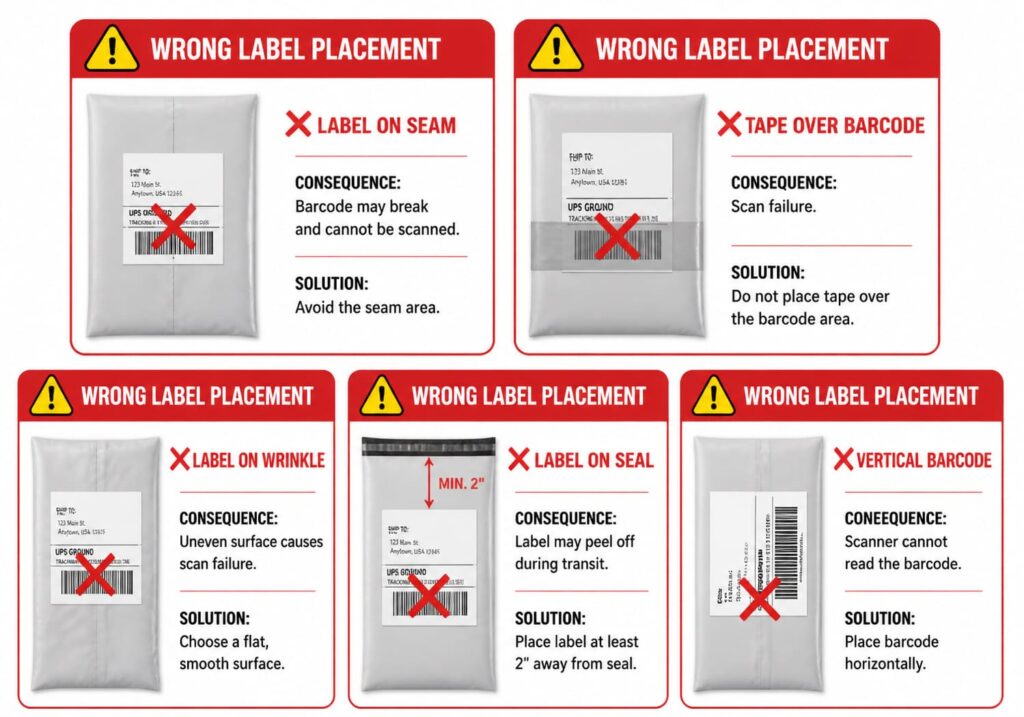
Mistake 1: Label Over Seams
Seams on poly mailers create raised edges. A label applied over a seam will not lie flat, creating a curved barcode that scanners cannot read. Solution: Always inspect the surface before applying labels and avoid seam areas.
Mistake 2: Placing Tape Over Barcodes
Covering a barcode with tape—intentionally or accidentally—renders it unreadable. This is one of the most common causes of sorting failures. Solution: Apply tape to label edges only, never over the barcode area.
Mistake 3: Ignoring Temperature Effects on Thermal Labels
Thermal labels exposed to high temperatures (like inside a hot delivery vehicle or left in direct sun) can turn completely black, making barcodes unreadable. Solution: Use thermal labels rated for high-temperature environments, or use inkjet/laser labels in hot climates.
Mistake 4: Not Preparing the Surface
Poly mailer film often has dust, static, or release agents that prevent adhesive from bonding. Labels applied without surface preparation are prone to peeling. Solution: Wipe down the surface with a dry cloth before applying labels.
Mistake 5: Vertical Label Orientation
A vertically oriented label wraps around the curve of a poly mailer during processing, making the barcode unreadable from any scanner angle. Solution: Always apply labels horizontally.
Need High-Quality Poly Mailers for Your Business?
We offer a wide selection of poly mailers in various sizes and colors, plus weatherproof labels designed for reliable scanning.
Quick Reference: Poly Mailer Addressing Checklist
Before shipping any poly mailer package, run through this checklist:
Pre-Shipping Checklist
- Surface prepared: Wiped clean of dust and debris
- Return address: Placed in upper LEFT corner
- Recipient address: Placed in CENTER front on flattest area
- White space: At least 1 inch of clear space around address
- Label orientation: Horizontal, not vertical
- No seams: Label not placed over seam lines
- No folds: Label applied to wrinkle-free area
- Edges secured: Firm pressure applied to all label edges
- Corner tape (if needed): Applied to label corners for extra security
- Barcode clear: No tape or covering over barcode area
Frequently Asked Questions
1.Where do you put the return address on a poly mailer?
Place the return address in the top LEFT corner of the poly mailer. This is standard practice and ensures the package can be returned to you if it becomes undeliverable. Never place the return address on the back without also placing one on the front.
2.Can you write directly on a poly mailer?
Yes, but you must use a permanent marker like Sharpie with waterproof, smudge-proof ink. Regular ballpoint pens will smear on plastic surfaces. Give the ink at least 30 seconds to dry before stacking or packaging.
3.What happens if my poly mailer label is on a wrinkled surface?
Wrinkled or curved labels fail to scan properly. Handheld scanners cannot read curved barcodes, causing manual sorting delays, delivery errors, or packages being returned to sender. Always apply labels to flat surfaces.
4.Why do poly mailer labels fall off?
Poly mailers are made of plastic that can be dusty or have release agents from manufacturing that prevent adhesive from bonding properly. Clean the surface with a dry cloth before applying. Use corner tape for extra security on the label edges.
5.What type of pen works best on poly mailers?
Permanent markers (Sharpie or similar) work best on poly mailers. Choose black ink for maximum contrast. Avoid ballpoint pens, gel pens, and felt-tip markers which all smear on plastic surfaces. For dark-colored mailers, use white adhesive labels instead of writing directly.
6.How do you address dark colored poly mailers?
Use WHITE adhesive labels on dark poly mailers. Metallic markers (silver, gold) will rub off during handling and scanners cannot read them. Black ink on a white label provides the best contrast and scanner reliability.
7.Can I use tape over my shipping label on a poly mailer?
Yes, but NEVER place tape over the barcode on thermal labels as it can cause fading and scanning failures. For inkjet-printed labels, you SHOULD cover with tape to prevent water damage, but always avoid the barcode area.
8.What is the lumpy package problem with poly mailers?
The lumpy package problem occurs when labels are applied to curved or uneven surfaces on flexible poly mailers. Barcodes wrap around curves during automated sorting and cannot be fully scanned, causing delays, misroutes, or return to sender.
9.Should I address poly mailers before or after filling them?
Address BEFORE filling if possible, when the mailer is flat and you have maximum surface area. If addressing after filling, find the flattest section and smooth it carefully before applying the label.
10.Can I use a thermal printer for poly mailer labels?
Yes, thermal printers are recommended for poly mailers due to their durability and smudge resistance. However, avoid leaving thermal-labeled packages in hot cars as heat can cause labels to turn completely black, making barcodes unreadable.
Conclusion: Ensure Your Package Arrives
Properly addressing poly mailers is not complicated, but it requires attention to detail. The consequences of cutting corners—lost packages, customer complaints, reshipping costs—far outweigh the few extra seconds it takes to apply a label correctly.
Remember these key principles:
- Flat surfaces only: The lumpy package problem is the number one cause of scan failures
- Left corner for return, center for recipient: Standard placement that carriers expect
- White labels on dark mailers: Never write directly on dark poly mailers with metallic markers
- Permanent markers only: If handwriting, Sharpie is your friend
- Prepare the surface: Clean, dry surfaces hold labels better
- Test before bulk shipping: Verify your process works before scaling up
By following the techniques in this guide, you will significantly reduce label failures, improve delivery success rates, and eliminate the hidden costs of preventable shipping errors.
For more information on poly mailer products and shipping supplies designed for reliable delivery, browse our complete catalog.
Ready to eliminate seal failures and size mismatches from your supply chain?
Request a formal quote with your specifications. Response within 4 business hours.
RHK Packaging — ISO 9001:2015 Certified Manufacturer Since 2010
[email protected]